Construction Job Costing Template: Did the Job Make Money in 2026?
Construction job costing is the habit of tracking what one job actually cost against what you quoted for it: materials off the receipts, labor hours at a real rate, subs, and the permits, dump runs, and fuel that never make it into the guess. A job costing template gives that habit a home: one sheet per job, quote next to actual, and a profit line that answers the only question that matters: did this job make money?
Most small crews know their year but not their jobs. The bank account says the season worked out, but nobody can say which jobs carried it and which ones quietly worked for free. That is the expensive part, because you price next spring with the same gut that mispriced this one. Costing even three jobs, honestly, tells you more about your pricing than any rule of thumb ever will.
Free construction job costing templates to download
Three working versions, pre-filled with realistic numbers from a residential remodel so you can see what honest job costing looks like before you enter your own. Every download is a plain .xlsx file that opens in Excel, Google Sheets, or any spreadsheet app. No email address required.
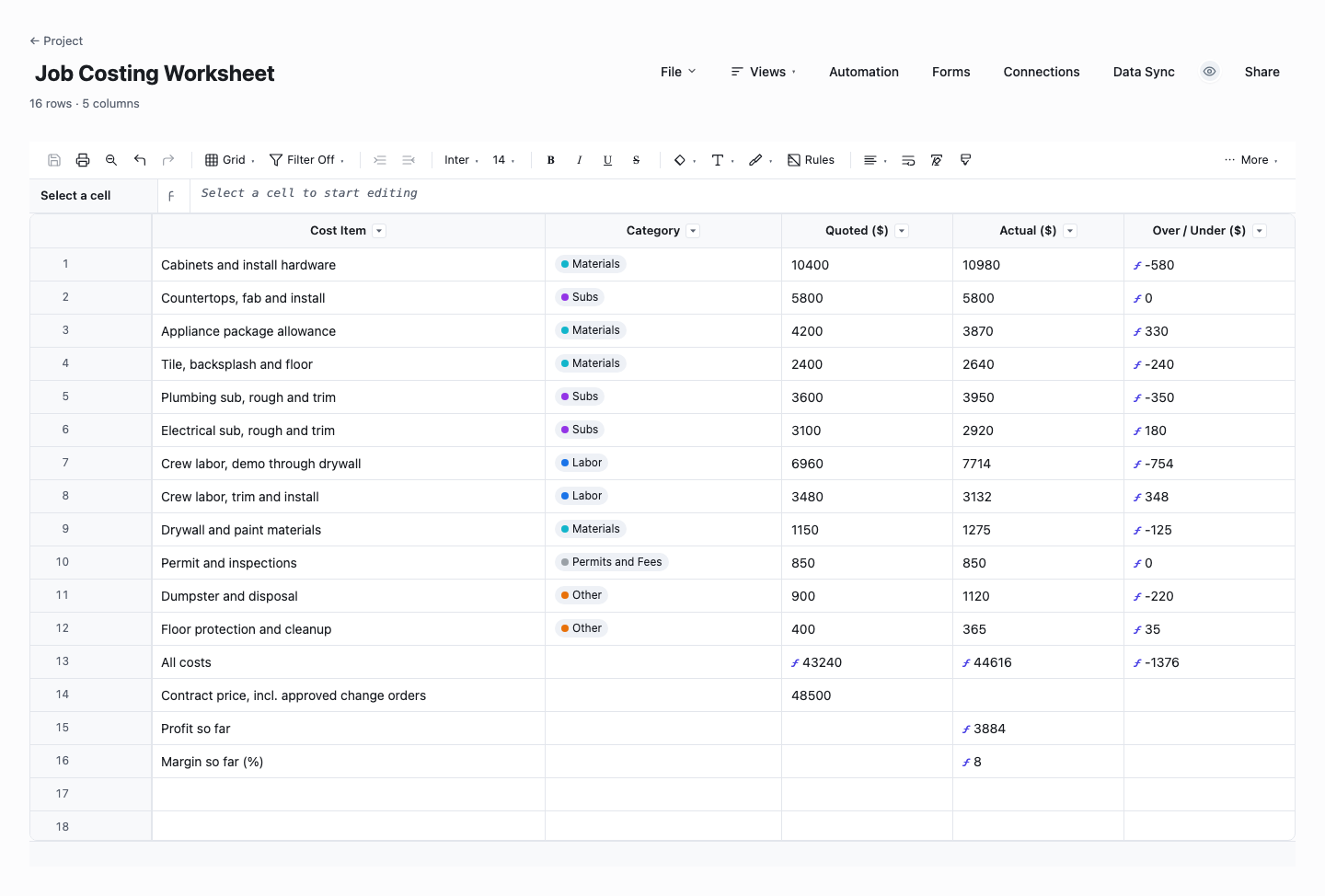
Job Costing Worksheet
The job costing worksheet is quote vs actual for one job, line by line: each cost item in its category with the number you priced and the number it landed at, and an over-or-under column that computes itself per row. The bottom rows turn total cost into profit and margin against the contract price. Use it at the end of a job to get the true verdict, then keep it open on the next quote so every line you price has last job's reality next to it.
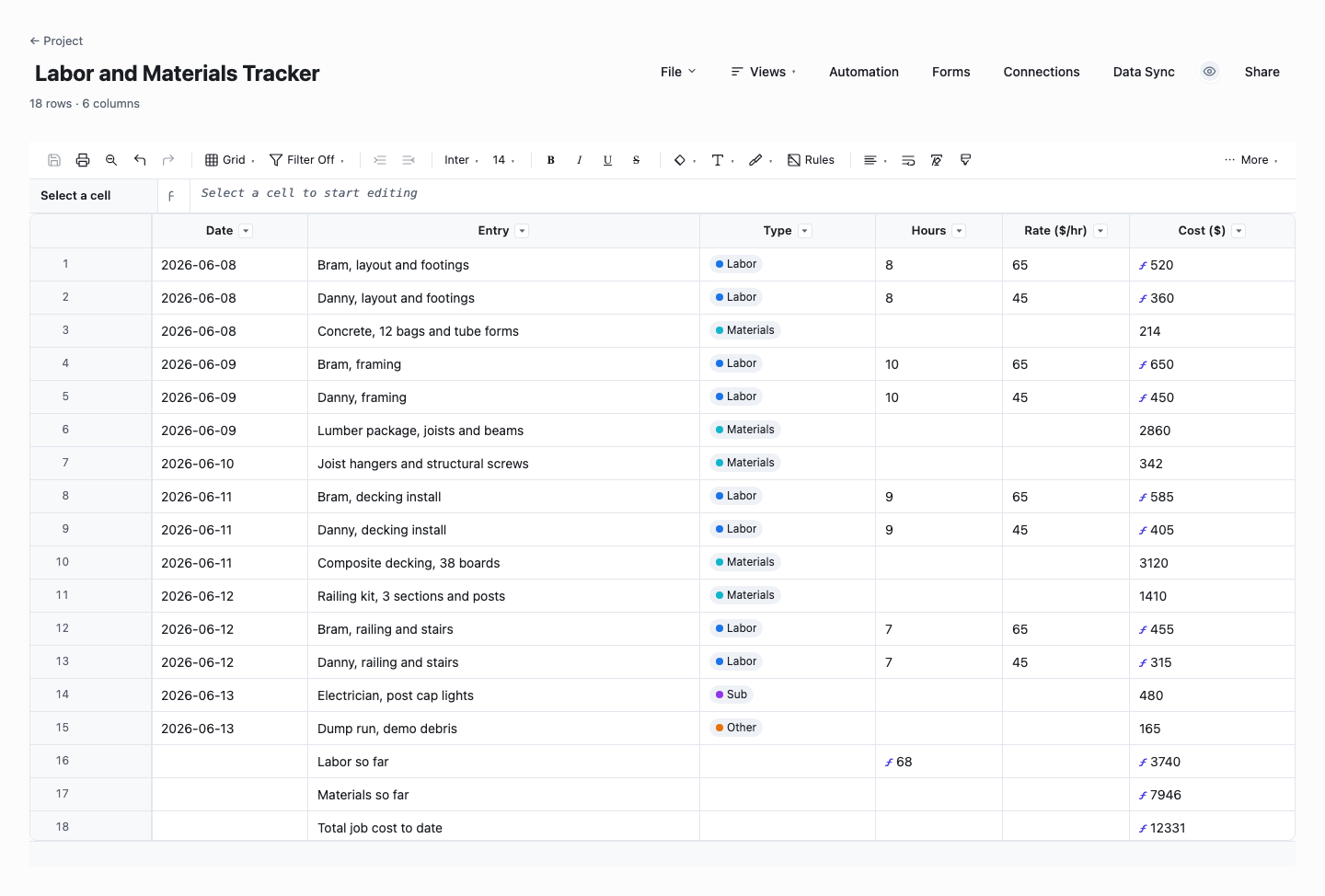
Labor and Materials Tracker
The labor and materials tracker is the running log for a job in progress: one row per receipt or crew day, dated, with labor rows computing hours times rate as you type. Summary rows keep labor, materials, and the total current, so you always know where the job stands against the quote while there is still time to do something about it. Use it from day one of any job big enough to hurt. It feeds the worksheet its actuals with no end-of-job archaeology.
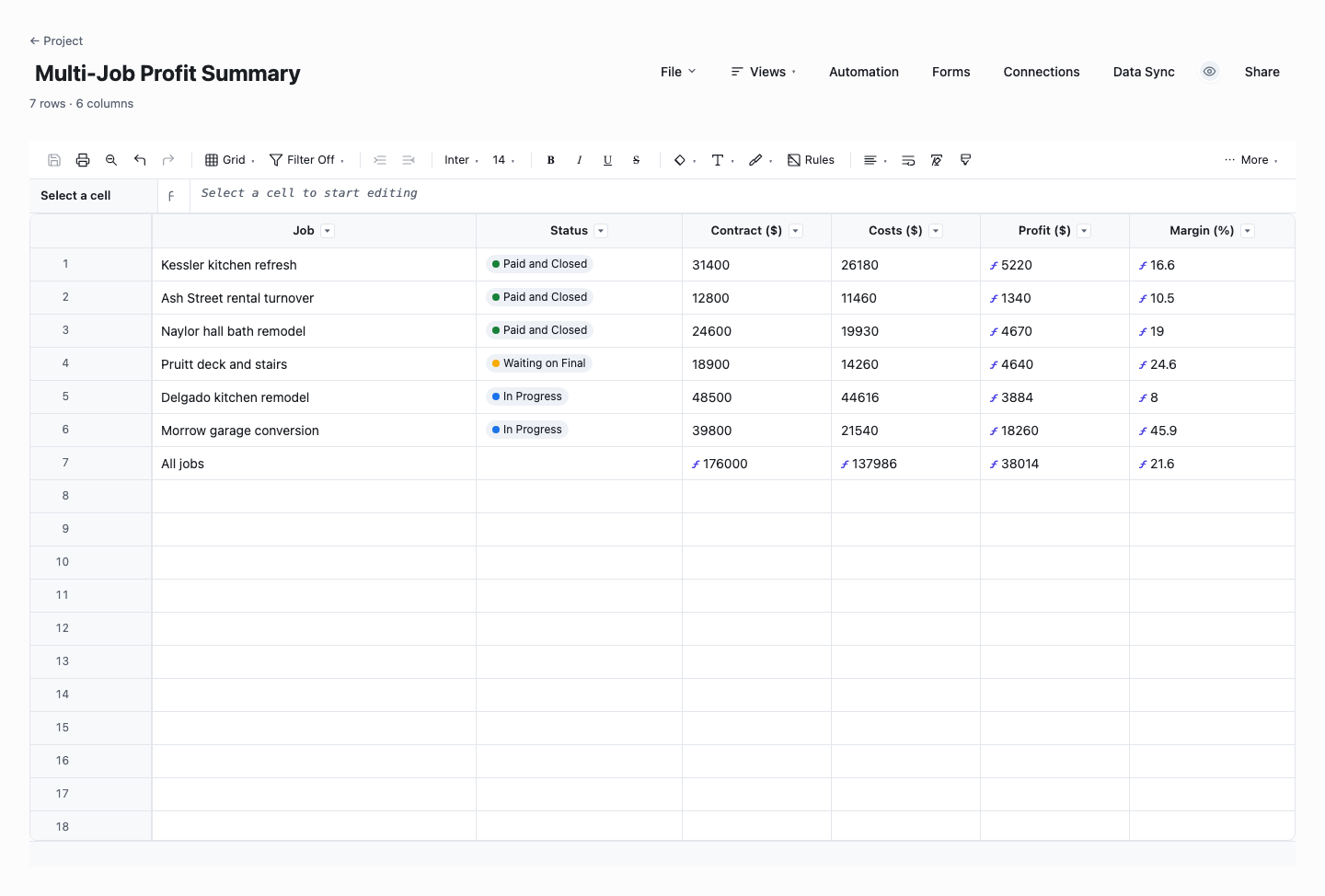
Multi-Job Profit Summary
The multi-job profit summary is the season on one sheet: a row per job with contract, costs, and live profit and margin formulas, plus a totals row that says whether the whole operation is making money. Use it to spot the pattern the individual sheets hide: which kinds of jobs keep landing fat, which kinds keep coming in thin, and what that says about who you should be quoting for next year. Three rows in, it starts earning its keep.
How to cost a job without turning into a bookkeeper
Open the sheet the day you win the job
Job costing done in one painful sitting at the end of a job is archaeology: half the receipts are gone and the hours are a guess. Costing done as you go is thirty seconds at the tailgate: the lumber run goes in when it happens, the crew day goes in with the hours. Start the sheet from the quote itself, one row per line you priced, and the tracking columns fill in as the job runs.
Count your own hours at a real rate
The most common lie in small-crew job costing is free owner labor. If you swung a hammer for sixty hours, the job consumed sixty hours of a skilled tradesperson, and the sheet should price them at what you would pay someone else to do that work. A job that only pencils out when you work for nothing is a losing job wearing a winning number, and it will talk you into taking more jobs just like it.
Track the small stuff in one catch-all category
Permits, dump fees, fuel, blades, the porta-john, the rental you kept two extra days: individually too small to track, together often a four-figure hole in the estimate. Do not build a category for each. Keep one "other" bucket and toss every stray receipt in it. Forget accounting precision. The point is that the bucket total shows up in next year's quotes as a real line instead of a shrug.
Log extras against the job, and bill them
When the homeowner adds work mid-job, the cost side lands in your sheet automatically because you are logging as you go. The revenue side only lands if the extra was priced and approved, which is a change order log's job. Costing and the change log work as a pair: one proves what the extras cost you, the other makes sure you actually got paid for them, and the gap between the two is the exact number the job leaked.
Read the margin, not just the profit
Five thousand dollars of profit means one thing on a twenty thousand dollar deck and something very different on a hundred and forty thousand dollar addition. Margin, profit divided by price, is the number that makes jobs comparable, which is why the template computes it per job. Set a target and judge every finished job against it. Where it landed matters less than whether you know it, in writing, before you price the next one.
Close the loop into next year's quotes
The sheet earns its keep the day you quote the next similar job. Pull up the finished one: materials ran eight percent over takeoff, framing took a day and a half longer than planned, the "other" bucket ate nine hundred dollars. Those are not failures, they are your actual production rates, and a quote built on them beats a quote built on optimism every time. Three costed jobs make your pricing sharper than most competitors will ever get.
Watch: job costing (2 minutes)
A job costing spreadsheet that works like Excel, because it is
Every download on this page is a plain spreadsheet: rows, columns, and formulas you can read. The over-under column is a subtraction, the margin line is a division, and if you want to change how something computes, you click the cell and change it. No setup wizard, no accounting jargon, nothing to learn beyond what you already know from Excel.
The same sheets run live in Wisegrid, and the point is that it feels identical: it is literally just like Excel to use. Type =[Hours]@row * [Rate ($/hr)]@row once and every labor row prices itself. The profit summary recomputes as receipts land. The difference is underneath: the sheet is on every phone in the crew, edits stage locally and save when you hit Save, and your spreadsheet imports in with formulas working, not flattened into numbers.
That matters for job costing specifically because the data entry happens in the truck, at the lumber yard, and at the kitchen table, and a sheet that lives on one laptop only gets updated at the kitchen table. The habit survives when the log is wherever the receipt is.
Frequently asked questions
What is job costing in construction?
Job costing is tracking every dollar a specific job consumes, materials, labor, subcontractors, and incidentals, and comparing that total to what you charged, so you know the profit on that job rather than just the health of the whole year. For a small residential crew it does not require accounting software or cost codes: a disciplined sheet with a row per cost, kept current while the job runs, answers the question that matters. Did this job make money, and by enough to be worth doing again?
How do I set up a job costing spreadsheet?
Start from the quote: one row per line you priced, grouped into materials, labor, subs, and other. Give each row a quoted column and an actual column, and let a third column compute the difference. Add a labor log that multiplies hours by rate so crew time turns into dollars without mental math, and finish with a summary that subtracts total cost from the contract price and divides for margin. That is the whole structure, the templates above ship it built, with the formulas live.
What costs should I include when costing a job?
Everything the job caused: materials with waste included, every labor hour at a loaded rate (your own hours too), sub invoices, equipment rental, permits, dump runs, fuel, and consumables like blades and fasteners. The test is simple: if the job had not happened, would you have spent it? Overhead that exists either way, like the shop and the truck payment, is better handled in your pricing markup than allocated line by line, but the job-caused costs belong on the sheet.
What is a good profit margin on a construction job?
There is no honest universal number: it moves with your market, trade, overhead, and how much risk the job carries. The useful move is to stop asking in the abstract and start measuring your own: cost three finished jobs and you will know your real margins, which jobs earn them, and what your overhead needs the average to be. Then set your own floor and quote to it. A crew that knows its numbers can defend a price, a crew quoting on gut can only match whatever the other bids say.
How is job costing different from my accounting software?
Accounting tells you about the business, job costing tells you about the job. Your books can be immaculate and still never say that the Hendersons' kitchen lost money because demo ran nine days instead of five. Job costing lives closer to the work: it is kept by the person on site, updated the day money moves, and organized the way you quote, not the way taxes file. Keep both. They answer different questions.
Can I do job costing while the job is still running?
That is when it is most valuable. End-of-job costing is an autopsy. Running costing is a dashboard gauge you can still act on. If materials are over at rough-in, you can tighten the rest of the job, talk to the homeowner early, or at minimum stop the bleeding on extras. The labor and materials tracker above is built for exactly this: log costs as they land and the summary stays current, so "where are we against the quote" always has a same-day answer.
Run it live instead of in a file.
The downloads above are yours either way. In Wisegrid the same template becomes a working sheet with owner contacts, status dropdowns, reminders, and dashboards. 7-day free trial, no credit card required.